What Is Minecraft CurseForge?
What CurseForge Does for Minecraft
CurseForge is a popular platform for discovering Minecraft Java Edition mods and modpacks. It helps players explore, download, and manage content for modded Minecraft. The CurseForge website lets users browse projects and check their details. The CurseForge app helps manage mods, modpacks, and custom game profiles.
The basic workflow is simple:
Minecraft Java Edition → CurseForge → Mods or Modpacks → Modloader → Custom Profile
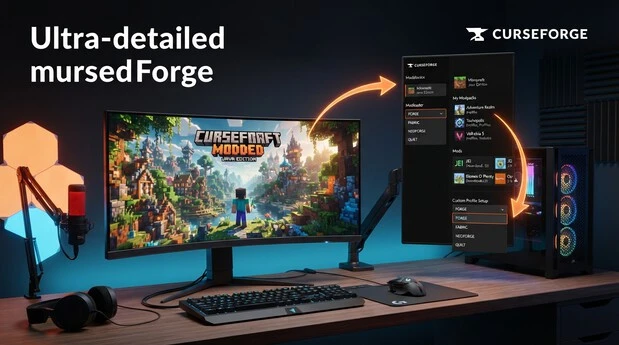
A modloader helps Minecraft run compatible mods. CurseForge supports popular modloaders, including Forge, Fabric, NeoForge, and Quilt. Its Minecraft section also includes worlds, resource packs, data packs, addons, and shaders. This makes CurseForge useful for players who want to customize their Minecraft experience.
CurseForge Website vs CurseForge App
The CurseForge Minecraft website helps users discover content. You can search for mods, modpacks, Minecraft versions, and project categories. Each project page provides useful details about its files and compatibility.
The CurseForge Minecraft app handles installations and profile management. You can create profiles, install mods, and manage modpacks through the app. It also helps organize different Minecraft setups on your computer.
When you select an installation option on the website, it may open the CurseForge app. The app then handles the installation process.
In simple terms, use the website to find Minecraft content. Use the app to install and manage that content.
What Can You Download From Minecraft CurseForge?
Minecraft Mods
Minecraft mods add or change features in Minecraft Java Edition.
They can improve gameplay, add new mechanics, or change existing systems.
Some mods focus on performance and help optimize the game.
Others expand exploration with new biomes, structures, mobs, or items.
Building mods can add new blocks and construction features.
Interface mods can improve menus, maps, inventory, or information displays.
Technology and magic mods can introduce machines, automation, spells, and new progression systems.
Minecraft Modpacks
Minecraft modpacks combine multiple mods into one playable setup.
They can also include configuration files, required dependencies, and other settings.
A modpack creates a prepared experience instead of requiring players to install every mod separately.
Different packs focus on goals such as survival, technology, magic, exploration, or progression.
Other Minecraft Content
CurseForge also includes worlds, resource packs, data packs, addons, shaders, and other customization content.
These projects can change visuals, world settings, gameplay elements, or the overall Minecraft experience.
Available content depends on the supported Minecraft version and project type.
Is CurseForge for Minecraft Java or Bedrock?
CurseForge and Java Edition
The Minecraft CurseForge modding workflow in this guide is mainly for Minecraft Java Edition.
The CurseForge app supports Java Edition for installing and managing mods and modpacks.
You can create profiles with a Minecraft version and compatible modloader.
Mods must match the selected Minecraft version and modloader to work correctly.
This makes CurseForge useful for managing different Java modded setups without mixing incompatible files.
When you choose a mod or modpack, always check its supported Minecraft version and modloader before installing.
What About Bedrock Edition?
Minecraft Bedrock Edition uses a different customization system from Java Edition.
Bedrock players commonly use add-ons, maps, texture packs, and other supported content.
CurseForge also has a separate Bedrock section for this type of content.
However, Java mods cannot simply be installed on Bedrock Edition.
Always choose content made specifically for your Minecraft edition.
Minecraft CurseForge Modloaders Explained
Forge
Forge is a Minecraft modloader that allows compatible mods and modpacks to run. CurseForge supports Forge profiles for supported Minecraft versions. A Forge profile should use mods built for the same Minecraft version and Forge compatibility. Mods made for other loaders may not work correctly.
Fabric
Fabric is another Minecraft modloader with its own compatible mods and modpacks. CurseForge lets you create Fabric profiles for supported Minecraft versions. When installing a Fabric mod, make sure the profile uses the required Minecraft version and compatible Fabric setup.
NeoForge
NeoForge is a separate Minecraft modloader that users may see on newer projects. Some mods and modpacks are specifically developed for NeoForge. If a project lists NeoForge as its required loader, create or select a matching NeoForge profile before installing it.
Quilt
Quilt is another modloader supported by CurseForge. It has its own compatible mods and modpacks. When using Quilt, select a supported Minecraft version and make sure the content you install lists Quilt compatibility. A mod made for another loader may not work with a Quilt profile.
Vanilla Profiles
Vanilla profiles use the original Minecraft experience without a modloader. They do not support Minecraft mods or modpacks. You can still use supported content such as resource packs and maps with a Vanilla profile.
How to Download and Install CurseForge for Minecraft
Download the CurseForge App
To start, visit the official CurseForge website and open the Minecraft section. Select the CurseForge app download option for your desktop platform. Download the installer and run it after the download finishes. Follow the installation instructions shown on screen. Once the process completes, open CurseForge and continue with the initial setup.
Set Up the Minecraft Modding Folder
CurseForge creates a dedicated Minecraft modding environment for your profiles, mods, and modpacks. During setup, you can choose the location where CurseForge stores this content. For most users, the standard recommended location is the simplest option. It keeps your CurseForge files organized without requiring manual folder management. You do not need to manually install another copy of Minecraft for this CurseForge setup.
Sign In and Connect Minecraft
CurseForge works with your Minecraft installation and the account used to access Minecraft Java Edition. After setup, you can create and manage Minecraft profiles through the app. When launching a modded profile, CurseForge can open the Minecraft Launcher and start the selected setup. Depending on the available configuration, CurseForge may also provide its own launcher option. Make sure the required Minecraft account is connected before launching. Once connected, you can install mods and modpacks and start them from your CurseForge profiles.
How to Install Minecraft Mods With CurseForge
Find a Minecraft Mod
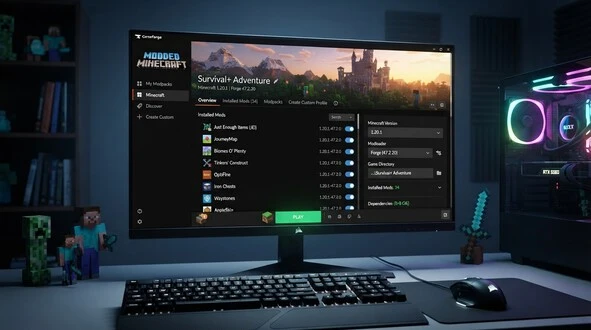
Open the CurseForge app and select Minecraft, then search for the mod you want to use. Open the project page and check its supported Minecraft version and modloader. Also review the required dependencies listed by the project. These details help you choose the correct file and avoid compatibility problems. Always confirm that the mod matches your selected profile before installing it.
Install a Mod Into a New Profile
After finding a suitable mod, select the installation option provided by CurseForge. When creating a new profile, CurseForge can automatically detect the appropriate Minecraft version and modloader for the selected mod. It then creates a profile with the required setup and adds the mod to it. Wait for the installation to finish before launching the profile. You can find the new setup in your Minecraft profiles.
Add a Mod to an Existing Profile
To add a mod to an existing setup, open the required profile in CurseForge and select the option to add more content. Search for the Minecraft mod you want to install and open its listing. Choose a version that matches the profile’s Minecraft version and modloader. CurseForge then adds the compatible mod to that profile. Check any required dependencies before launching.
Launch Minecraft With the Mod
Open the profile after installing the mod and select Play to launch Minecraft. Once the game loads, check that the mod appears and its features work correctly. If the mod does not load, check the Minecraft version, modloader, and required dependencies first.
Explore Minecraft Fabric to enhance your Minecraft gameplay with compatible mods and new features.
How to Install Minecraft Modpacks From CurseForge
Find a Modpack
Open the CurseForge app and select Minecraft, then search for a modpack that matches your preferred gameplay style. You can use filters to narrow results by Minecraft version, modloader, and category. Categories can help you find packs focused on survival, adventure, technology, magic, or exploration. Before installing a pack, open its project page and check the supported Minecraft version and modloader.
Install a CurseForge Modpack
Open the modpack page and select Install. CurseForge creates a dedicated profile for the selected modpack and downloads its required files. This can include mods, configuration files, and dependencies needed by the pack. Wait for the installation to finish completely before launching it. Once the profile appears in your Minecraft section, open it and review the installed content if needed. Select Play when the setup is ready, and CurseForge will launch the modpack with its required files.
Launch and Manage the Modpack
CurseForge keeps each installed modpack inside its own profile, making different setups easier to manage. You can open a profile to view its installed content and available settings. When updates become available, check the profile for compatible mod or modpack updates before applying them. You can also add compatible content when the modpack supports additional modifications. Always check the Minecraft version and modloader before adding anything manually. CurseForge also supports importing custom modpacks. After making changes, select Play and verify that Minecraft loads correctly.
8. Dependencies
What Is a CurseForge Profile?
A CurseForge profile is a separate Minecraft Java Edition setup with its own configuration and files. It can contain a specific Minecraft version, modloader, installed mods, and settings. Separate profiles let you keep different modded setups organized. This also helps prevent changes in one setup from affecting another.
Check Minecraft Version Compatibility
Having the same Minecraft version does not automatically make every mod compatible. A mod must support the specific version used by your profile. For example, a mod built for one Minecraft release may not work with another release. Always check the project’s supported versions before installing it.
Check Modloader Compatibility
The modloader must also match the mod you want to install. A Forge mod should use a Forge profile, while a Fabric mod should use a Fabric profile. The same rule applies to NeoForge mods and NeoForge profiles. Check the project’s loader requirement before installation.
Check Dependencies
Some Minecraft mods require additional libraries, APIs, or supporting mods to work correctly. These are called dependencies. CurseForge can identify required dependencies during installation when they are available. Make sure required dependencies match your Minecraft version and modloader. Missing dependencies can prevent a mod from loading properly.
How to Create a Custom Minecraft Modpack in CurseForge
Create a Custom Profile
Open the Minecraft section in the CurseForge app and select Create to start a custom profile. Give the profile a name that identifies its purpose or gameplay style. Next, choose the Minecraft version you want to use. Select a compatible modloader, such as Forge, Fabric, NeoForge, or Quilt. CurseForge then creates the profile with your selected Minecraft version and modloader.
Add Mods and Other Content
Open your new profile and use the content options to add compatible projects. You can search for and install Minecraft mods directly through CurseForge. Depending on the profile and supported content, you can also add resource packs and maps. Always check compatibility before adding content to your custom setup.
Launch the Custom Profile
Once your content is installed, open the custom profile and select Play. CurseForge launches Minecraft using the profile’s selected version, modloader, and installed content.
Common Minecraft CurseForge Problems and Fixes
CurseForge Mod Is Not Working
If a CurseForge mod is not working, first check the Minecraft version and modloader. Make sure the mod supports both. Then check its required dependencies and confirm they are installed. Also look for duplicate or conflicting versions of the same mod in your profile.
CurseForge Modpack Crashes
A crashing modpack can result from incompatible mods, missing dependencies, or conflicting files. Check whether recently added content matches the pack’s Minecraft version and modloader. You should also check available system resources, especially RAM and storage. Removing recently added content can help identify the source of the crash.
Mod or Modpack Is Not Showing
If a mod or modpack does not appear, check your search filters and selected Minecraft version. Also confirm the required modloader and profile settings. Incorrect filters can hide compatible projects from the results.
CurseForge Installation or Download Error
For installation or download errors, restart the CurseForge app and try again. Check that your internet connection and storage are available. If the problem continues, verify the affected files and follow the relevant official CurseForge support guidance.
Repair or Recreate the Profile
Use the profile repair option when available to fix damaged or missing files. If the problem continues, create a clean profile with the correct Minecraft version and modloader.
Minecraft CurseForge FAQs
Is Minecraft CurseForge Free?
Yes, CurseForge provides its Minecraft app and platform for discovering and managing Minecraft content without requiring a separate payment for CurseForge itself. However, Minecraft Java Edition is a separate product. Some third-party content or services may have their own terms or requirements.
Is CurseForge Safe for Minecraft Mods?
CurseForge is a major platform for Minecraft mods and modpacks, with project moderation and security measures. However, no third-party download platform can guarantee that every file is risk-free. Check project information, download files from trusted sources, and keep your Minecraft setup updated.
Does CurseForge Work With Minecraft Java Edition?
Yes, CurseForge supports Minecraft Java Edition for modding. You can use the CurseForge app to create profiles, install compatible mods and modpacks, select supported modloaders, and manage different Minecraft setups. Always check the Minecraft version and loader required by each project.
Can You Install Minecraft Modpacks With CurseForge?
Yes, you can install Minecraft modpacks through the CurseForge app. Select a compatible modpack, choose Install, and let CurseForge create its profile and download the required files. You can then open the profile and select Play to launch the modpack.
Does CurseForge Support Forge and Fabric?
Yes, CurseForge supports both Forge and Fabric for compatible Minecraft profiles. When installing a mod or modpack, check which loader it requires. A Forge project should use a compatible Forge profile, while a Fabric project should use a compatible Fabric profile.
Can I Use NeoForge or Quilt With CurseForge?
Yes, CurseForge supports NeoForge and Quilt profiles for compatible Minecraft projects. The required loader depends on the individual mod or modpack. Before installation, check the project’s listed Minecraft version and modloader. Using the correct combination helps avoid compatibility problems.
Can CurseForge Mods Work on Bedrock Edition?
Java Edition mods cannot simply be installed on Minecraft Bedrock Edition. Bedrock uses a different content system that includes add-ons, maps, resource packs, and other supported content. Always check whether a project is specifically designed for Java Edition or Bedrock Edition.
Why Is My CurseForge Mod Not Working?
A CurseForge mod may fail because of an incorrect Minecraft version, incompatible modloader, missing dependency, or conflicting mod. Check the project’s requirements and compare them with your profile. Remove duplicate or incompatible files and make sure all required dependencies are installed.
Do CurseForge Mods Need Dependencies?
Some CurseForge mods require additional libraries, APIs, or supporting mods called dependencies. These files provide functions the main mod needs to operate. CurseForge can identify and install available required dependencies during setup. Always check the project’s dependency requirements before launching the profile.
Does CurseForge Install Minecraft Automatically?
CurseForge manages modded Minecraft profiles, but it does not replace ownership of Minecraft Java Edition. You need a valid Minecraft installation and account to play. Depending on your setup, CurseForge can work with the Minecraft Launcher to launch your selected modded profile.