Minecraft Ore Finder: Find Ore Locations by Seed and Coordinates
A Minecraft Ore Finder helps you locate ores using your world seed and coordinates. It uses Minecraft’s world-generation data to predict where specific ores can generate. You can search for diamonds, iron, gold, copper, redstone, emeralds, and other resources.
Your Minecraft version and edition matter. World generation can change between versions, so your finder settings must match your world. Mojang has documented major changes to ore distribution and world generation across updates.
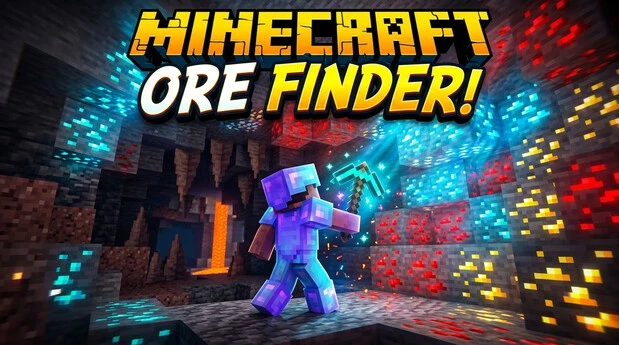
Use an ore finder as an exploration tool. Check your seed, compare coordinates, and verify locations in-game. Avoid cheats, exploits, or methods that break server rules.
What Is a Minecraft Ore Finder?
A Minecraft Ore Finder is a tool that helps you locate specific ores from your world seed. It can show ore types, nearby locations, and X/Y/Z coordinates. Many tools also let you set a search radius and choose the Overworld or Nether.
What an Ore Finder Shows
An ore locator can filter results by ore type. Common options include diamonds, iron, gold, copper, redstone, emeralds, and ancient debris. Some tools group nearby blocks into ore veins or clusters. They can also sort results by distance from your current position.
Your ore coordinates use three values: X, Y, and Z. X and Z show your horizontal position. Y shows your vertical level. A search radius limits how far the finder looks around your starting point.
Ore Finder vs. Minecraft Seed Map
An ore finder focuses on specific ore locations. A seed map viewer gives you a wider view of your generated world. It can display biomes, structures, terrain, and other features.
| Tool | Main purpose |
| Ore Finder | Locate specific ores |
| Seed Map | Explore the broader generated world |
| Ore Vein Map | Visualize ore-generation locations |
A seed map may also include an ore-vein feature. However, an ore finder usually makes targeted ore searches faster.
How Does a Minecraft Ore Finder Work?
A Minecraft Ore Finder uses your world seed, game version, and coordinates to calculate where specific ores may generate. Minecraft world generation is based on the seed and generation rules for the selected version. When those inputs match your world, the finder can identify likely ore locations without scanning the game itself. Version accuracy matters because world-generation changes can alter terrain and ore placement.
World Seed and Procedural Generation
Minecraft uses a world seed as the basis for generating a world. The generation process is deterministic when the seed and compatible generation rules remain the same. Ore generation is one part of this larger process. An ore finder uses seed and generation data to calculate likely locations for specific ores. It does not physically scan your world. Instead, it predicts locations from the same generation rules that created the world. If the seed or generation version is wrong, the calculated locations may not match your world.
Why Minecraft Version and Edition Matter
Java Edition and Bedrock Edition have important technical differences. Their world formats and some generation behavior differ. Minecraft has also changed world generation across major updates, including changes to terrain, caves, and ore distribution. Some compatible seeds can generate the same terrain across Java and Bedrock, but other generated features can differ. Always select the exact Minecraft version and edition that match your world. This helps the finder produce more reliable coordinates.
How Coordinates Identify Ore
Minecraft uses three coordinates to describe a position. X represents east or west, Y represents vertical height, and Z represents north or south. An ore finder uses these values to identify where an ore block, vein, or nearby area may generate. You can then travel to those coordinates and verify the result in-game.
How to Use a Minecraft Ore Finder
Using a Minecraft Ore Finder is simple when you have the correct seed, edition, and game version. Most tools follow the same basic process. Enter your world information, choose an ore, and use the returned coordinates to explore your world. The exact options can vary between ore-finder tools, so always check which Minecraft versions and editions the tool supports.
1. Get Your Minecraft World Seed
First, find the seed for your Minecraft world. In Java Edition, you can use the /seed command when you have permission to use commands. Bedrock players can view the seed through their world settings. Copy the complete seed without changing any numbers. Minecraft supports 64-bit seeds on Bedrock, including seeds that can be shared with Java Edition.
2. Select Your Minecraft Version and Edition
Choose the correct Minecraft edition and version in the ore finder. Select Java Edition or Bedrock Edition, then choose the exact supported version when available. World-generation rules can change between updates, so using the wrong version may produce incorrect ore coordinates.
3. Enter Your Coordinates
Enter your current X, Y, and Z coordinates if the tool asks for a starting position. X and Z identify your horizontal location, while Y identifies your height. These coordinates help the finder calculate nearby ore locations and sort results by distance.
4. Choose an Ore
Select the resource you want to find. Common choices include diamond, iron, gold, copper, redstone, emerald, lapis lazuli, and ancient debris. Some tools support several ore types at once. Your available options depend on the specific ore finder and its supported Minecraft versions.
5. Search the Map or Coordinates
Run the search after entering your settings. Depending on the tool, results may appear as map markers, ore coordinates, clusters, or nearby locations. A search radius can limit results to areas around your current position. Use the returned X, Y, and Z values to plan where to explore.
6. Verify the Location In-Game
Treat finder results as calculated locations, not guaranteed live-world scans. Travel to the coordinates and check the area in your actual world. If the ore is missing, recheck your seed, edition, version, coordinates, and dimension. This verification step helps catch incorrect settings or generation differences before you rely on the result.
What Ores Can You Find With a Minecraft Ore Finder?
A Minecraft Ore Finder can help locate many naturally generated ores across the Overworld and Nether. The exact options depend on the tool and Minecraft version it supports. Ore distribution also changes by depth, terrain, and certain biome conditions.
Overworld Ores
Common Overworld targets include Diamond Ore, Deepslate Diamond Ore, Iron Ore, Copper Ore, Gold Ore, Coal Ore, Redstone Ore, Lapis Lazuli Ore, and Emerald Ore. These ores do not generate evenly across the world. Their distribution changes with height, and some have additional biome-related patterns. For example, copper generates in larger amounts in Dripstone Caves, while emerald ore is associated with mountainous biomes. Diamond, redstone, and other deep ores become more relevant at lower heights.
An ore finder can use these generation rules to identify likely locations for a selected ore. Always match the finder to the Minecraft version that generated your world.
Nether Ores and Resources
The Nether has its own resource-generation rules. An ore finder may locate Ancient Debris, Nether Quartz Ore, and Nether Gold Ore, depending on its supported features. Nether quartz generates in blobs within netherrack, while ancient debris is found in the lower depths of the Nether.
Netherite is not an ore block. It is a valuable resource obtained by processing Ancient Debris into Netherite Scrap and combining it with gold.
Ore Veins and Clusters
Ore does not always appear as one isolated block. Generation can create groups of nearby blocks, often called ore veins or clusters. An ore finder may therefore show an area containing multiple related blocks instead of one exact target. This makes the map or coordinates more useful for exploration.
If you want to learn how to find buried treasure in Minecraft, click here to visit this page.
Minecraft Ore Locations and Y Levels
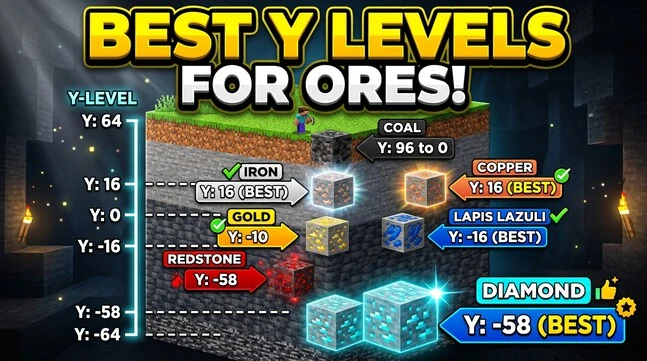
Y level is important when using a Minecraft Ore Finder because ores generate at different heights. Some ores favor deeper underground areas, while others generate across broader ranges. Biomes can also affect certain resources. For example, copper is more common in Dripstone Caves, while emeralds favor mountain-type biomes.
Why Y Level Matters
Minecraft uses different height ranges for ore generation. As a result, searching for an ore at an unsuitable Y level can reduce the chance of finding it. A finder can use these generation rules to identify relevant locations. However, Y levels should be treated as generation tendencies rather than guaranteed coordinates.
| Ore | Useful generation context |
| Diamond | Deep underground, especially at lower Y levels |
| Redstone | Deep underground, with more generation at lower levels |
| Iron | Multiple height ranges, including higher elevations |
| Copper | Mid-level ranges; more common in Dripstone Caves |
| Coal | Broad distribution, with stronger generation at higher levels |
| Gold | Multiple ranges; additional generation occurs in Badlands |
| Lapis Lazuli | Underground, with generation centered around lower levels |
| Emerald | Mountain-type biomes and higher terrain |
| Ancient Debris | Nether; commonly targeted around Y 15–16 |
Practical Ore-Level Reference
These ranges describe general generation behavior, not guaranteed ore locations. Minecraft has changed ore distribution across versions, so always verify the exact values against the version supported by your ore finder.
Why One Y Level Does Not Find Every Ore
There is no single Y level that is ideal for every ore. Modern Minecraft uses different distribution patterns for different resources. Choose the ore first, then consider its generation range, biome, and dimension. This approach gives an ore finder more useful context when locating specific resources.
Minecraft Ore Finder for Java vs. Bedrock
A Minecraft Ore Finder can behave differently depending on the edition and version of your world. Java Edition and Bedrock Edition use different world formats and can have differences in generation behavior. Some seeds can produce matching terrain across both editions, but this does not mean every generated feature or tool result is identical.
Java Edition
For Java Edition, enter the exact world seed and select the matching Minecraft version when the finder provides version options. The tool uses generation data to calculate ore locations and coordinates. Version changes can affect generated content, so an older or newer version may return different results. Java-specific tool support should always be confirmed before using an ore finder.
Bedrock Edition
For Bedrock Edition, use a finder that specifically supports Bedrock and your Minecraft version. Bedrock supports 64-bit world seeds, and compatible seeds can produce the same world between Java and Bedrock in supported generation contexts. However, Bedrock has its own world format and generation behavior, so tool support and version compatibility still matter.
Always Match the World Version
The safest approach is simple: match your seed, edition, and exact supported Minecraft version. Never assume an ore finder supports both Java and Bedrock. Check the tool’s compatibility information before trusting its coordinates.
Why Are Minecraft Ore Finder Results Wrong?
Minecraft Ore Finder results can be inaccurate when the tool settings do not match the world. Minecraft has changed world-generation and ore-distribution rules across versions, so even small setup errors can affect predicted locations.
Wrong Seed
A single incorrect digit in the world seed can point the finder to a different generated world. Check the complete seed before searching. Avoid manually retyping long seeds when possible.
Wrong Minecraft Version
Minecraft has changed ore distribution and other world-generation rules across updates. A finder using different generation data may return coordinates that do not match your world. Always select the correct supported version.
Wrong Edition
Java Edition and Bedrock Edition can have different generation behavior and tool support. Do not assume that a finder designed for Java will produce correct Bedrock results. Check the tool’s supported edition before searching.
Wrong Dimension or Coordinates
Make sure you are searching the correct dimension. Overworld and Nether locations use different generation rules. Also check your X, Y, and Z coordinates carefully before using nearby-search features.
Mods, Add-ons, or Data Packs
Custom mods, add-ons, and data packs can change world-generation behavior. A seed-based finder may not account for those changes. For the most reliable result, compare the calculated location with your actual world and verify finder results in-game.
How to Verify Ore Finder Coordinates In-Game
An ore finder provides calculated locations based on your seed and selected world-generation settings. It is not a live scanner that reads blocks from your current world. Minecraft coordinates identify your exact X, Y, and Z position, making them useful for checking predicted ore locations.
- Match the Minecraft version: Confirm that the finder uses the same version as your world.
- Choose the correct dimension: Make sure the result belongs to the Overworld or Nether you are exploring.
- Travel to the X and Z coordinates: Use the reported horizontal coordinates to reach the target area.
- Check the Y level: Compare your vertical position with the finder’s reported Y coordinate.
- Inspect surrounding blocks: Look around the target location because generated ore may be part of a nearby group.
- Compare nearby results: If the finder shows a vein or cluster, check several reported locations rather than relying on one block.
If the expected ore is missing, recheck the seed, version, edition, dimension, and coordinates before assuming the finder is incorrect. This simple verification step helps confirm that calculated results match your actual Minecraft world.
Using an Ore Finder Within Fair-Play Boundaries
An ore finder can support legitimate exploration when you use it within the rules of your Minecraft world. The best approach is to use seed-based information for planning and learning, not to bypass gameplay restrictions.
Fair Exploration
You can study your own world seed to understand ore distribution and plan exploration routes. An ore finder can help you learn where resources generate and navigate toward calculated locations. Using seed-map information can also help you explore a personal world more efficiently while learning how Minecraft world generation works.
Avoid Cheats and Exploits
Avoid using X-ray exploits, glitches, or unauthorized server methods to locate resources. Do not use tools to circumvent server rules or restrictions. Multiplayer servers may have their own policies about seed-based tools and external maps. Always follow the rules of your world or server before using an ore finder.
Here’s a natural internal linking line for Minecraft Patch 1.21:
Want to download and install Minecraft Patch 1.21? Click here for the full guide.
Minecraft Ore Finder vs. Manual Mining
Different methods support different exploration goals. An Ore Finder uses seed and generation information to help plan where specific resources may occur. A Seed Map provides a broader view of the generated world. Manual mining remains the normal in-game way to discover resources. Knowing general ore-level patterns can also help you choose productive areas. Minecraft’s official documentation confirms that ore distribution varies by height, with no single Y level being best for every ore.
| Method | Best for |
| Ore Finder | Planning locations from seed data |
| Seed Map | Visual world exploration |
| Manual Mining | Normal in-game exploration |
| Ore-level knowledge | Choosing productive mining areas |
The best choice depends on your goal. Use generation-based tools for planning, maps for broader navigation, and manual exploration for normal gameplay.
Minecraft Ore Finder FAQ
What is a Minecraft ore finder?
A Minecraft Ore Finder is a seed-based tool that calculates likely ore locations. It uses your world seed, Minecraft version, edition, coordinates, and selected ore type to provide locations you can check in-game.
Can I find diamonds with a Minecraft ore finder?
Yes, if the specific tool supports Diamond Ore for your Minecraft version and edition. Enter your correct seed and settings, then search for diamond locations. Always verify the reported coordinates in your actual world.
Can a Minecraft ore finder find ancient debris?
Some ore finders support Ancient Debris in the Nether. Support depends on the tool and Minecraft version. Select the Nether dimension and use matching world settings before checking the calculated coordinates in-game.
Does a Minecraft ore finder work on Bedrock?
Some ore finders support Bedrock Edition, but not all do. Check the tool’s compatibility information before using it. Select your exact Bedrock version and enter the correct world seed for the most reliable results.
Does a Minecraft ore finder work on Java?
Many ore finders support Java Edition, but compatibility varies between tools and versions. Select the Java version that matches your world. A finder using different generation data may produce coordinates that do not match your world.
Why are my ore-finder coordinates incorrect?
Check your world seed, Minecraft version, edition, dimension, and X/Y/Z coordinates. Generation changes can affect results. Mods, add-ons, or data packs may also change your world. Verify the reported location in-game before relying on the result.
Do I need my Minecraft seed?
Yes, most seed-based ore finders require your Minecraft world seed. The seed helps the tool calculate locations from world-generation data. Without the correct seed, it cannot reliably predict where ores generated in your specific world.
Is a Minecraft ore finder accurate?
Accuracy depends on the tool, Minecraft version, edition, and your settings. A finder calculates locations from world-generation rules rather than scanning your live world. Always match your settings and verify results at the reported coordinates.