What Is Buried Treasure in Minecraft?
What Buried Treasure Is
Buried treasure is a naturally generated chest hidden underground in Minecraft. You usually find it near beaches, coastlines, or underwater terrain. Minecraft introduced buried treasure with the Update Aquatic.
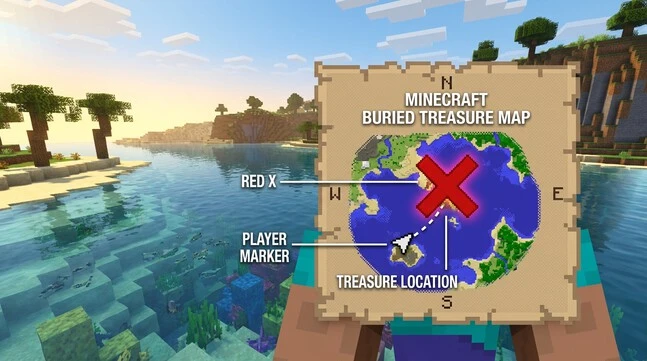
A treasure map gives you the easiest way to locate the chest. It shows the target area with a large red X. Follow the map until your player marker reaches that spot.
The chest contains valuable loot for exploration and survival. Every buried treasure chest contains a Heart of the Sea. You can use this item to craft a Conduit for powerful underwater effects.
Where the Treasure Hunt Starts
Your treasure hunt usually starts by finding a Buried Treasure Map. Shipwrecks provide the most direct way to find one. Search the shipwreck until you locate its map chest.
Ocean ruins can also provide treasure maps. These underwater structures often sit on the ocean floor. Minecraft’s official resources confirm that shipwrecks and underwater ruins belong to the same ocean exploration system that introduced buried treasure.
Once you find a map, open it and look for the red X. That mark points toward your buried treasure. Your next step is learning how to read the map and follow it accurately.
How To Find Buried Treasure Minecraft Map
Find a Shipwreck
The easiest way to get a Minecraft treasure map is to find a shipwreck. Shipwrecks generate in ocean biomes and can also appear near beaches or shorelines.
A shipwreck can contain up to three chests. The map chest sits in the lower part of the wreck. In Java and Bedrock, this chest has a 100% chance to contain a buried treasure map.
Search the entire wreck if you cannot spot the map chest immediately. Damaged or unusual shipwrecks may have missing sections. Some chests may also become difficult to access.
Once you find the map chest, take the Buried Treasure Map. You do not need to loot every other chest first. The map gives you the location of your next target.
Check Ocean Ruins
Ocean ruins offer another way to find a buried treasure map. These small underwater structures generate across different ocean environments.
Their chests can contain buried treasure maps, but the chance is lower than with shipwreck map chests. Current Minecraft Wiki data lists about 41.7% for small ruins and 43.5% for large ruins.
Search the ruin’s chest and take the map if you find one. Then leave the structure and prepare to follow the red X. The next step is learning how to read that map correctly.
How to Read a Minecraft Treasure Map
Understand the Red X
A Minecraft treasure map uses a large red X to mark the buried treasure.
Your position appears as a player marker on the map. The marker moves as you travel through the world. When you are far away, it may appear near the map’s edge.
Travel toward the red X and watch your marker closely. Your goal is to bring the marker into the X area.
Do not treat the X as a single guaranteed block. The map points to the treasure location, but you still need to pinpoint the chest before digging.
Understand Map Directions
Treasure maps use a fixed orientation. North appears at the top of the map. East appears on the right, while west appears on the left. South appears at the bottom.
Use these directions to plan your movement. If your marker sits below the X, travel north. If it sits left of the X, travel east.
Your marker also shows your position relative to the mapped area. This makes the map useful for navigation even before you reach the treasure.
Move Your Marker Toward the X
Start by traveling toward the red X. Keep checking the map as you move. Your marker should gradually approach the marked treasure area.
When you reach the correct region, slow down and position yourself carefully. Align your marker with the middle of the X as closely as possible. Minecraft Wiki notes that the treasure uses the X’s center for its target position.
Do not start digging as soon as you see the X. First, get your position as accurate as possible. This reduces random digging and makes the next step much easier.
Once your marker reaches the target area, you can use coordinates and chunk positions to find the chest more precisely.
How to Find the Exact Treasure Location
Use Coordinates to Narrow the Search
Coordinates give you your exact position in the Minecraft world. X tracks east and west, while Z tracks north and south.
In Java Edition, press F3 to open the debug screen and view your coordinates. Current Java versions also offer configurable debug information.
In Bedrock Edition, open Settings > Game and enable Show Coordinates.
Coordinates make treasure hunting much more precise. They help you stop guessing once you reach the red X.
Java Edition: Use Chunk-Relative Coordinates
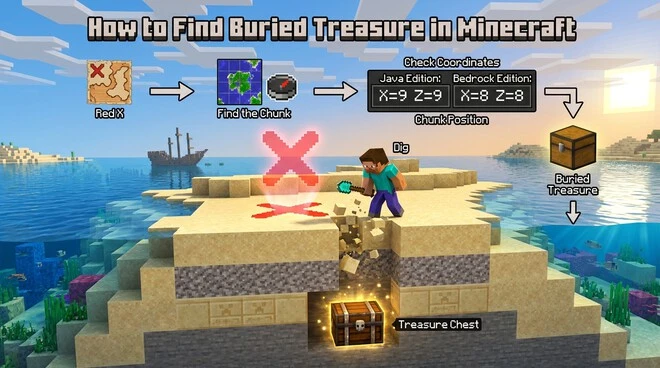
Minecraft divides the world into 16×16-block chunks. Buried treasure generates at X=9 and Z=9 within its chunk.
This gives you a precise digging point after you reach the red X. Open the F3 screen and check your chunk-relative position.
Move until both local X and Z values reach 9. Then dig at that position.
Do not confuse these values with your normal world coordinates. A world coordinate might show thousands of blocks from spawn. The 9,9 position describes your location inside the current chunk.
Bedrock Edition: Use Chunk-Relative Coordinates
Bedrock Edition uses X=8 and Z=8 within the chunk for buried treasure generation.
The main idea remains the same. First, reach the red X. Then identify the correct chunk and its local position.
Bedrock does not use Java’s F3 debug screen. Instead, you can enable Show Coordinates through the game settings.
Make sure you use the coordinate method for your edition. Mixing the Java and Bedrock positions can send you to the wrong block.
Important Coordinate Distinction
9,9 in Java and 8,8 in Bedrock are chunk-relative positions, not normal world coordinates.
How to Dig Up Buried Treasure
Start Directly Around the Red X
Stop when your player marker reaches the red X on the treasure map. The X gives you the target area for the chest.
Do not dig immediately at the first block you reach. First, move toward the center of the X. Use your coordinates to improve your position.
Equip a shovel before you start digging. Remove sand and gravel around the target area. These blocks commonly appear on beaches and coastal terrain.
Start close to the center instead of digging one random block. Clear a small area around your position. This gives you a better chance of exposing the chest.
Search Around the Target Area
The treasure chest may not appear from your first block. Do not assume the map is wrong if you find nothing immediately.
Expand your search around the target position. Clear several nearby blocks before moving far away. Check the surrounding sand and gravel carefully.
Your coordinates can make this process much faster. Use the Java 9,9 or Bedrock 8,8 chunk-relative position from the previous section. This reduces unnecessary digging.
If the chest remains hidden, widen your search gradually. Avoid creating a huge hole immediately. A controlled search keeps the area easier to navigate.
Check Different Blocks and Terrain
Buried treasure can be hidden beneath more than just surface sand. Check beneath sand and gravel around the target.
Also check sandstone and stone when terrain generation covers the chest. Players can sometimes find treasure beneath unexpected terrain blocks.
Underwater treasure also needs careful checking. The chest can generate beneath ocean-floor terrain.
Do not expect every chest at one fixed depth. The surrounding terrain affects how much digging you need.
If sand or gravel gives way to sandstone or stone, keep searching near the target. Your goal is to locate the chest, not follow one fixed digging pattern.
You can also use our Minecraft Structure Finder to quickly locate villages, temples, strongholds, and other structures.
Best Preparation for Treasure Hunting
Essential Items
Bring a shovel before searching for buried treasure. It lets you clear sand and gravel quickly.
A boat makes ocean travel much easier. Swimming across large oceans takes more time and leaves you exposed underwater. Minecraft also recommends boats for exploring ocean areas.
Carry enough food for the journey. Bring basic survival supplies too. Extra blocks can help you reach or escape difficult terrain.
Underwater Preparation
Some buried treasure generates beneath underwater terrain. Prepare before diving into deep water.
Water Breathing gives you more time underwater. It helps when the chest sits beneath the ocean floor.
Respiration on a helmet extends your underwater breathing time. It gives you more time to search without surfacing.
Night Vision improves visibility in dark underwater areas. This makes sand, gravel, and other blocks easier to spot.
Watch for drowned while searching underwater. They can attack while you focus on finding the chest. Drowning itself also becomes a risk when your oxygen runs out.
Take your time during underwater exploration. Keep an escape route to the surface. Good preparation makes treasure hunting safer and faster.
How Dolphins Can Help Find Buried Treasure
Feed a Dolphin
Dolphins can help you locate nearby ocean structures and buried treasure. They are especially useful when you are already exploring an ocean.
Find a dolphin and feed it raw cod or raw salmon. These are the foods dolphins respond to for this interaction. Minecraft confirms that dolphins can lead players toward buried treasure, shipwrecks, or ocean ruins.
Stay close after feeding the dolphin. Watch its movement instead of swimming randomly.
Follow the Dolphin
Follow the dolphin as it swims away. It can guide you toward a nearby buried treasure, shipwreck, or ocean ruin.
This method can save exploration time when you do not have a treasure map nearby. However, the dolphin does not replace a treasure map’s red X.
Use the dolphin as an alternative way to narrow your search. Once you reach the target area, switch to your normal digging method.
Keep your shovel ready and watch your oxygen while following the dolphin. Underwater hazards can still make the search dangerous.
Why You Cannot Find the Treasure Chest
Your Marker Is Not Properly Aligned
Being close to the red X does not always mean you are directly over the chest. The treasure map marks the target area with a red X.
Move around the area while watching your player marker. Try to position it as close to the center of the X as possible.
Do not dig a large hole after reaching the general area. Recheck the map first. Small position changes can help you narrow the search.
Use your coordinates to confirm your position before digging farther. This gives you a more controlled search instead of random digging.
You Used the Wrong Coordinate Method
Java and Bedrock use different chunk-relative positions for buried treasure. Java Edition uses X=9, Z=9, while Bedrock Edition uses X=8, Z=8 within the target chunk.
Do not apply the Java position to a Bedrock world. The same applies in reverse.
Also, do not treat 9,9 or 8,8 as normal world coordinates. They describe a position inside a chunk.
Minecraft coordinates use X, Y, and Z to describe your position in the world. Java players can view them with F3, while Bedrock players can enable Show Coordinates.
You Did Not Search Enough Terrain
Sometimes the chest remains hidden after your first few blocks. Expand your search gradually around the target.
Check the surrounding sand and gravel first. Then look below the surface if the chest remains hidden.
Do not ignore underwater terrain. Buried treasure can generate beneath ocean-floor terrain.
Also check areas covered by sandstone or stone. Terrain can sometimes place these blocks over the chest instead of leaving a simple sand surface. Community reports also document treasure appearing beneath stone in Bedrock.
Avoid assuming every chest sits at one fixed depth. The surrounding terrain affects how much digging you need.
If you still cannot find the chest, return to the map and verify your position. Then repeat the search with a slightly wider area.
What You Get From Buried Treasure
Heart of the Sea
The biggest reason to find buried treasure is the Heart of the Sea. Every buried treasure chest contains one. It is also the only source of this item in normal Minecraft gameplay.
The Heart of the Sea is essential for crafting a Conduit. You combine it with eight Nautilus Shells to make one.
A Conduit provides powerful underwater effects when properly activated. It can improve underwater exploration and help you work underwater for longer.
Other Treasure Loot
Buried treasure also contains other useful loot. The chest can provide valuable resources alongside the Heart of the Sea.
You do not need to memorize the full loot table. The main reward is the Heart of the Sea, while the extra items make the discovery more worthwhile.
Java vs. Bedrock: Quick Treasure-Finding Differences
Map and Coordinate Workflow
The basic treasure-hunting process works similarly in both editions. Follow the treasure map and move toward the red X.
Both editions use coordinates to help you pinpoint your location. Java Edition shows coordinates through the F3 debug screen. Bedrock Edition provides them through Show Coordinates in the game settings.
The key difference appears when you use chunk-relative coordinates to pinpoint the chest.
Java vs. Bedrock Chunk Position
| Edition | Buried Treasure Chunk Position |
| Java Edition | X=9, Z=9 |
| Bedrock Edition | X=8, Z=8 |
These values describe the chest’s position inside its chunk. They are not your normal world X and Z coordinates.
Minecraft divides the world into chunks. Your world coordinates can show values such as X=500 or Z=-300. Chunk-relative coordinates describe where you are within the current 16×16-block chunk.
For Java Edition, target the chunk-relative 9,9 position. For Bedrock Edition, target 8,8.
Do not mix these methods. Using Java’s 9,9 position in Bedrock can lead you to the wrong block. The same problem occurs when using Bedrock’s 8,8 method in Java.
Always confirm your edition before using the coordinate method. Minecraft officially documents separate coordinate tools for Java and Bedrock.
FAQ: Finding Buried Treasure in Minecraft
How deep is buried treasure in Minecraft?
There is no single fixed depth for buried treasure. Terrain affects how deeply the chest gets covered. Check the area around the red X instead of relying on one depth.
Can buried treasure be underwater?
Yes. Buried treasure can generate beneath underwater terrain. Ocean floors can contain sand, gravel, and other terrain around the chest.
What does the red X mean on a Minecraft treasure map?
The red X marks the approximate location of the buried treasure. Move your player marker toward its center, then use coordinates to narrow the search.
Does every buried treasure chest contain a Heart of the Sea?
Yes. The Heart of the Sea is found in buried treasure. It is used with Nautilus Shells to craft a Conduit.
What should I do if I cannot find the chest?
Recheck your position on the map. Confirm your edition and use the correct chunk-relative coordinates. Then expand your search around the X and check nearby terrain.