Minecraft Patch Shader Download
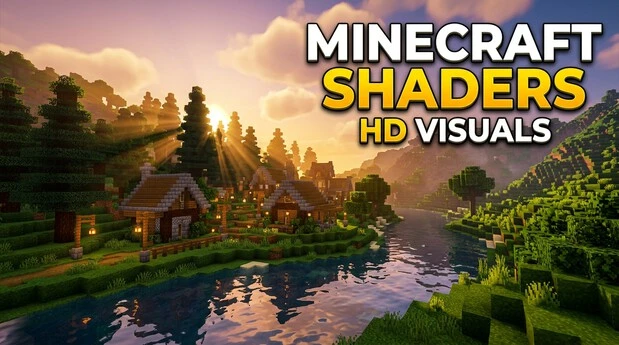
Minecraft Patch Shader Download refers to finding shader packs or visual upgrades that work with your Minecraft version. Minecraft shaders can improve lighting, shadows, water, reflections, and atmospheric effects. They can make worlds look more realistic without changing the core gameplay.
The download process differs between Java and Bedrock Edition. Java players can use shader loaders such as Iris with compatible shader packs. Bedrock players can use Vibrant Visuals and supported visual or resource packs on compatible devices.
Always check the latest Minecraft version before downloading a shader. Version mismatches can cause crashes, visual glitches, or compatibility problems. Use trusted sources such as official project pages and established mod platforms. Avoid unknown APKs, modified clients, and suspicious download sites.
What Is Minecraft Patch Shader Download?
What the Term Means
“Minecraft Patch Shader Download” is a search phrase, not an official Minecraft product name. It usually refers to finding visual enhancements that match a specific Minecraft version. A Minecraft patch updates the game itself. A shader pack changes how the game renders its world. Shaders can improve lighting, shadows, reflections, water, and atmospheric effects. They do not normally add new gameplay mechanics. This difference matters when searching for a safe download. You do not need a separate “shader patch” for every Minecraft update.
Shader Packs vs. Shader Loaders vs. Resource Packs
A shader pack controls visual effects such as lighting and shadows. A shader loader helps Minecraft Java Edition load compatible shaders. Iris provides a modern shader-loading option for Java players. A resource pack changes textures, models, sounds, or other assets. PBR textures add material data for effects such as reflections and surface detail. Each option has different requirements. Always check the Minecraft version before installing anything. This prevents compatibility issues and helps you choose the correct download.
Minecraft Java vs Bedrock: Which Shader Method Should You Use?
Java Edition Shaders
Minecraft Java Edition has a broad third-party shader ecosystem. Iris Shaders is a modern shader loader that works with many OptiFine shader packs. It currently supports several Java versions and works with Fabric, NeoForge, and Quilt.
Iris also includes Sodium for optimized rendering. OptiFine remains another established option for loading compatible shader packs. Fabric, NeoForge, and Quilt act as mod-loader platforms rather than shader packs themselves. Always match the loader, Minecraft version, and shader pack before installing. Iris does not support every shader or device, so compatibility can vary.
Bedrock Edition Visuals
Bedrock Edition uses a different approach. Vibrant Visuals is Minecraft’s official graphics upgrade for compatible Bedrock devices. It adds enhanced lighting, volumetric effects, reflective water, moving shadows, and other visual improvements.
Supported platforms include PC, Xbox, PlayStation, Android, and iOS, with hardware requirements varying by device.
Quick Comparison
| Feature | Java Edition | Bedrock Edition |
| Main visual method | Shader packs | Vibrant Visuals |
| Common Java loader | Iris | Not applicable |
| PBR support | Shader-dependent | Supported through Vibrant Visuals |
| Device compatibility | PC-focused | Supported Bedrock devices |
Best Minecraft Shaders to Download
The best Minecraft shader depends on your hardware, visual preferences, and Minecraft version. No single shader is ideal for every player. Check the pack’s current compatibility before downloading.
BSL Shaders
BSL Shaders delivers bright colors, realistic shadows, volumetric lighting, bloom, and customizable water. It supports Iris and OptiFine across many Java versions. Performance varies with enabled effects and graphics settings.
Complementary Shaders
Complementary Shaders offers two main styles: Complementary Reimagined and Complementary Unbound. Reimagined preserves Minecraft’s familiar look, while Unbound targets a more realistic style. It supports Iris and OptiFine across many Java versions.
Bliss Shaders
Bliss Shaders focuses on atmospheric, fantasy-style visuals with detailed lighting, shadows, reflections, and customization. It supports Iris and OptiFine. Check your GPU and Minecraft version before installation.
MakeUp Ultra Fast
MakeUp Ultra Fast focuses on a strong quality-to-performance balance. Many effects are optional, so you can reduce resource usage. It supports Iris and OptiFine and suits players seeking lighter shader performance.
Rethinking Voxels
Rethinking Voxels focuses on advanced colored lighting and sharp shadows. It is designed around Iris and can demand more hardware than lightweight shader packs. Its current compatibility should be checked carefully.
Sildur’s Shaders
Sildur’s Shaders is known for offering different performance levels and extensive visual customization. This makes it useful for players who want to adjust effects based on their hardware.
SEUS
SEUS, or Sonic Ether’s Unbelievable Shaders, is an established Minecraft shader project. SEUS Renewed targets high-quality visuals with traditional rendering, while SEUS PTGI explores path-traced lighting.
Kappa Shader
Kappa Shader uses a realistic yet slightly stylized visual approach. Its lighting, reflections, shadows, and atmosphere can create demanding workloads. Check its supported Minecraft version before downloading.
Tip: Choose shaders based on your GPU, target FPS, visual style, and Minecraft version. Performance can change significantly between different shader settings.
اكتشف طرق الاستمتاع بلعبة ماين كرافت مجانا مع أحدث الميزات والتحديثات.
How to Download Minecraft Shaders Safely
Choose a Trusted Source
Download shaders from reputable platforms and official project pages. Iris provides its official Java shader-loader project. Modrinth and CurseForge host established Minecraft shader projects. Minecraft.net and Microsoft Learn provide official information about Bedrock graphics and Vibrant Visuals. When possible, use the shader developer’s official project page. Avoid relying on random download mirrors or shortened links.
Check Version Compatibility
Before downloading, confirm your Minecraft edition and version. Then check the shader’s supported version and required loader. Java shaders may require Iris, OptiFine, or a compatible mod environment. Some packs also list required mods or specific graphics features. Check the hardware requirements too. A shader that loads correctly on one system may perform poorly on another.
Avoid Unsafe Downloads
Avoid modified Minecraft APKs, pirated clients, and unknown EXE installers. Be cautious with websites that use repeated or misleading download buttons. Unverified shader sites can also provide outdated or altered files. Never trust claims that offer a “free premium Minecraft” client or promise paid features without authorization. A shader pack should not require you to install an unrelated launcher or suspicious program. Use trusted sources and scan unexpected files before opening them.
How to Install Shaders on Minecraft Java Edition
Install a Compatible Shader Loader
Start with a shader loader that matches your Minecraft version. Iris is designed to load shader packs on Minecraft Java Edition. It also works with many existing OptiFine shader packs. Iris commonly uses Sodium for optimized rendering. Depending on your setup, Fabric, NeoForge, or Quilt may provide the required mod environment. Always check the loader and version requirements before installation.
Download a Compatible Shader Pack
Choose a shader pack that supports your Minecraft version. Check whether it works with Iris, OptiFine, or another supported loader. Download the pack from a trusted project page or established platform. Keep the shader file in its original format unless the developer provides different instructions.
Add the Shader Pack
After installing the compatible loader, launch Minecraft Java Edition.
- Open Minecraft and enter the video settings.
- Open the shader or shader-pack settings.
- Select the option to open the shader-pack folder.
- Place the downloaded shader pack inside that folder.
- Return to Minecraft and select the shader.
- Activate it and allow the game to apply the visual changes.
The exact menu names can vary between loader versions.
Adjust Shader Settings
Start with moderate settings. Reduce shadow quality, render quality, reflections, clouds, or volumetric effects if performance drops. You can also adjust related FPS and graphics settings. Change one setting at a time to find a good balance between visual quality and performance.
Restart if Necessary
Some shader changes apply immediately, while others may require a restart. If the shader does not load, check the Minecraft version, loader, and shader compatibility first. Remove conflicting shader packs or mods if necessary. Updating the loader or graphics drivers can also resolve compatibility problems.
How to Use Shaders on Minecraft Bedrock Edition
What Is Vibrant Visuals?
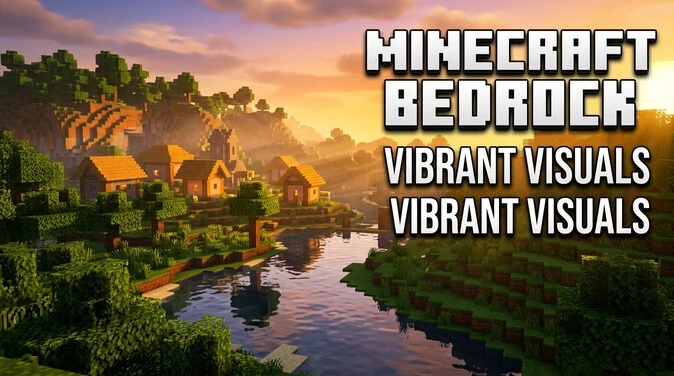
Vibrant Visuals is an official graphics upgrade for Minecraft Bedrock Edition. It uses a modern rendering system to improve the appearance of supported worlds. Features include directional lighting, volumetric fog, dynamic shadows, reflective water, and atmospheric effects. Microsoft documents Vibrant Visuals as a PBR-based rendering system. It improves visual quality without changing core gameplay.
How to Enable Vibrant Visuals
On a supported Bedrock installation, open Minecraft and go to:
Settings → Video → Graphics Mode → Vibrant Visuals
Select Vibrant Visuals to enable the enhanced rendering mode. Availability depends on your device, hardware, and supported Bedrock version. If the option does not appear, check your device compatibility and update Minecraft through its official platform.
Vibrant Visuals Resource Packs
Vibrant Visuals can work with resource packs designed for PBR materials. These packs can provide enhanced textures and material properties such as roughness, metalness, normal, emissive, and height information. Check the pack’s required Bedrock version and PBR capability before installing it.
Vibrant Visuals vs. Java Shaders
Vibrant Visuals is not the same as Java shader packs. Java typically uses loaders such as Iris to run shader packs. Bedrock uses its own rendering system with Vibrant Visuals. RTX ray tracing is separate from both and requires compatible ray-tracing hardware. Do not treat these technologies as interchangeable.
Minecraft Shader Compatibility and Performance
Version Compatibility
Shader compatibility depends on your Minecraft version, shader pack, and loader. A shader that works on one release may fail after an update. Changes to rendering systems can also cause visual glitches or crashes. Check the shader project page for supported Minecraft versions before downloading. For Bedrock, also check Vibrant Visuals and resource-pack requirements.
Hardware Requirements
Shader performance depends heavily on your GPU and available graphics resources. Your CPU and RAM also affect overall game performance. Keep graphics drivers updated for your hardware. On Bedrock, Vibrant Visuals additionally requires a supported device and graphics capability. Check the official requirements before enabling advanced visual features.
FPS and Performance
Shaders can reduce FPS because they add extra rendering effects. Start by lowering render distance if performance drops. You can also reduce shadow quality, reflection quality, and volumetric effects. Many shader packs provide quality presets for different hardware levels. Test settings in your normal world rather than judging performance from menus alone. Monitor FPS while changing individual settings.
Low-End vs High-End Hardware
Weaker systems should start with lightweight shaders and lower quality presets. Stronger GPUs can handle more advanced lighting, reflections, shadows, and volumetric effects. Choose settings based on your target FPS rather than visual quality alone.
Minecraft Shaders Not Working? Common Fixes
Wrong Minecraft Version
Check whether the shader supports your installed Minecraft version. Update or downgrade the shader pack when required. Also verify that your shader loader supports the same Minecraft release.
Incompatible Shader Pack
Try another shader pack that supports your loader and Minecraft version. Some packs require specific rendering features or have limitations with certain loader versions.
Missing or Incorrect Shader Loader
Java shaders usually require a compatible loader such as Iris or OptiFine. Confirm that the loader is installed correctly and matches your Minecraft version.
Outdated Graphics Drivers
Update your GPU drivers through the manufacturer’s official software or website. Restart Minecraft after updating the drivers and test the shader again.
Low FPS or Crashes
Lower render distance, shadow quality, reflections, or volumetric effects. Switch to a lower shader preset if available. If crashes continue, test without the shader.
Visual Glitches or Missing Textures
Check the shader’s supported version and required features. Disable incompatible resource packs and reload the shader. Reinstalling the shader can also fix a damaged download.
Conflicting Mods or Resource Packs
Temporarily disable other visual mods and resource packs. Launch Minecraft with only the shader loader and shader enabled. Re-enable other content one item at a time to identify conflicts.
Minecraft Patch Shader Download FAQs
What is Minecraft Patch Shader Download?
Minecraft Patch Shader Download is a search phrase for finding shader packs or visual upgrades compatible with a Minecraft version. It is not an official Minecraft product or patch.
How do I download Minecraft shaders safely?
Download shaders from trusted sources such as official project pages, Modrinth, or CurseForge. Check the Minecraft version, loader requirements, and hardware compatibility before installing any file.
Are Minecraft shaders free?
Many Minecraft shader packs are available for free. Some projects may offer optional paid versions or support programs. Always download from the developer’s official page or a reputable platform.
How do I install shaders on Minecraft Java Edition?
Install a compatible shader loader such as Iris or OptiFine. Download a compatible shader pack, open the shader-pack folder, add the pack, and activate it through Minecraft’s shader settings.
Can Minecraft Bedrock use shaders?
Bedrock uses a different graphics system from Java. Compatible devices can use Vibrant Visuals, while supported resource packs can add PBR-based visual improvements. Availability depends on the device and Minecraft version.
Is Vibrant Visuals the same as Minecraft shaders?
No. Vibrant Visuals is not the same as Java shader packs. It is an official Bedrock rendering upgrade. Java typically uses shader loaders such as Iris, while RTX ray tracing is a separate technology.
Can I use Minecraft shaders on Android?
Android Bedrock devices can use Vibrant Visuals when the device meets Minecraft’s requirements. Availability depends on supported hardware and the installed Bedrock version. Some compatible resource packs can further enhance visuals.
Which Minecraft shaders are best for low-end PCs?
Lightweight options such as MakeUp Ultra Fast can suit weaker hardware. Lower shader presets can also reduce performance demands. Test different settings because results depend on your GPU and Minecraft configuration.
Why are my Minecraft shaders not working?
Common causes include an incompatible Minecraft version, incorrect shader loader, unsupported shader pack, outdated graphics drivers, or conflicting mods. Check compatibility requirements and test the shader without other visual modifications.
Do Minecraft shaders change gameplay?
Most shader packs primarily change rendering and visual effects. They can improve lighting, shadows, reflections, water, and atmosphere without changing core gameplay mechanics. Performance can change because shaders add extra graphical processing.